
Features/Conditional Logic
Show each question only when it applies
Conditional logic shows or hides fields based on earlier answers, so a form stays short for everyone who fills it in. Rules run as the visitor types, and the builder shows each rule right on the fields it connects.
Forms that react to every answer
Show or hide
Eight comparisons
Rule after rule
Instant
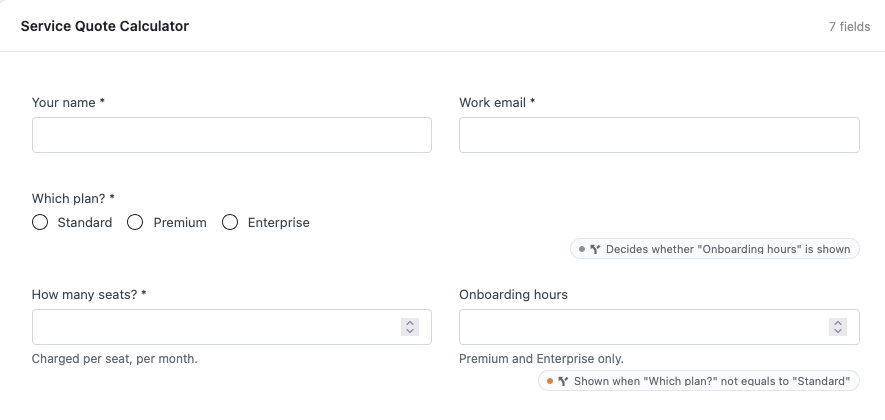
Marked on the canvas
Kept when copied
Set up a rule in three steps
Open the settings
In the form builder, open the Settings tab and choose Conditional Logic.
Add a condition
Click Add Condition, choose Show or Hide and the field it applies to.
Set the trigger
Pick the field, the comparison and the value that fires the rule, then save.
Conditional forms to try
These Hash Form Pro templates use it. Each demo is the real form, rendered straight from the template.
Support Triage (Conditional)
Feedback with Follow-up
Service Quote Calculator
Works well with
Questions, answered
Still wondering about Conditional Logic? The documentation covers every setting, and we are happy to help.
Is conditional logic free?
Yes. Conditional logic is part of the free Hash Form plugin.
Can one answer control several fields?
Yes. Add a condition for each field it should show or hide.
Do rules survive copying a form?
Yes. When you duplicate or import a form, its rules are pointed at the copy’s own fields.
Can I check the rules before publishing?
Yes. The preview marks conditional fields and says how many are hidden by a rule at that moment.
Start using Conditional Logic for free
Install Hash Form from WordPress.org and build your first form in minutes. Add Pro when a form needs more.